

If you own more than one mechanical keyboard, you’ve probably noticed that they don’t all use the same cable. Some use USB-C, others use Micro-USB, and older boards still use Mini-USB. Each connector type affects cable compatibility, durability, and convenience.
Before you buy a new keyboard cable, here’s what you need to know about the different connector standards.
The Three Connectors
USB-C (The Modern Standard)
USB-C is the current universal standard for modern electronics — including keyboards. It’s the connector type you’ll find on virtually every keyboard released after 2022.
· Shape: Reversible oval — plugs in either direction
· Data: USB 3.0+ speeds (5–10 Gbps)
· Power: Up to 100W (overkill for keyboards, but future-proof)
· Durability: Rated for 10,000+ insertions
· Found on: Keychron, GMMK, Ducky One 3, most modern boards
Pros: Reversible, durable, universal, fast data/power
Cons: More expensive connectors, some USB-C cables don’t fit all boards (recessed ports may need slimmer connectors)
Micro-USB (The Previous Standard)
Micro-USB was the standard for portable electronics from ~2007–2015. It’s still found on many mid-range and older mechanical keyboards.
· Shape: Trapezoidal, one direction
· Data: USB 2.0 (480 Mbps)
· Power: Up to 10W (sufficient for keyboards)
· Durability: Rated for 5,000–10,000 insertions
· Found on: Anne Pro 2, older Ducky boards, Filco, budget keyboards
Pros: Very common, cheap cables available everywhere
Cons: Not reversible, less durable than USB-C, loosens over time
Mini-USB (The Legacy Connector)
Mini-USB predates Micro-USB and was common on early 2010s electronics. It’s rare on modern keyboards but still appears on vintage and premium DIY boards.
· Shape: Small trapezoidal, one direction
· Data: USB 2.0
· Power: Up to 10W
· Durability: Rated for 5,000 insertions
· Found on: Vortex Poker, older custom builds, some Leopold boards
Pros: Sturdy connector design, still found on some high-end vintage boards
Cons: Rare, hard to find quality cables, not reversible
Comparison Table
| Feature | USB-C | Micro-USB | Mini-USB |
| Reversible | ✅ Yes | ❌ No | ❌ No |
| Data Speed | Up to 10 Gbps | 480 Mbps | 480 Mbps |
| Insertions Rated | 10,000+ | 5,000–10,000 | ~5,000 |
| Cable Availability | Everywhere | Everywhere | Limited |
| Keyboard Commonality | New boards (2020+) | 2015–2020 boards | Pre-2015 boards |
| Connection Firmness | Excellent (locks in) | Good (loosens over time) | Very good |
| Slim Connector Option | ✅ Yes (for recessed ports) | N/A | N/A |
| Future-Proof | ✅ Yes | ❌ No | ❌ No |
Compatibility: Can You Use Adapters?
If you have a Micro-USB keyboard but want to use a USB-C cable, the short answer is: use an adapter, but proceed with caution.
· Micro-USB to USB-C adapters exist and work for data
· Quality matters — Cheap adapters can cause intermittent connection issues
· Strain relief — An adapter adds leverage that can damage your keyboard’s port
For daily use, get a cable that matches your keyboard’s port directly, rather than relying on adapters.
Which Cable Should You Buy?
For a USB-C Keyboard
Buy a USB-C to USB-A cable (if your computer has USB-A ports) or a USB-C to USB-C cable (for newer laptops).
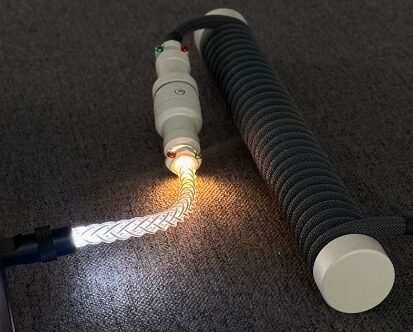
Our recommendation: Get a coiled USB-C cable with a 90° USB-C connector — it exits cleanly behind the keyboard and manages desk clutter. Look for cables listed as “USB-C” that explicitly state compatibility with recessed ports.
For a Micro-USB Keyboard
Buy a USB-A to Micro-USB cable. Micro-USB is being phased out, so invest in a high-quality cable that will last.
Most quality custom cable makers still offer Micro-USB options. Look for cables with reinforced Micro-USB connectors to prevent the common “loose connection” issue.
For a Mini-USB Keyboard
Buy a USB-A to Mini-USB cable. These are harder to find but still manufactured by custom cable builders.
Pro tip: If you have a Mini-USB keyboard you love, consider having a professional convert it to USB-C. Several modders offer this service — it requires desoldering the old port and soldering on a new USB-C breakout board.
Right-Angle vs Straight Connectors
For keyboard cables, the connector orientation matters:
· Straight connector: Exits directly perpendicular from the keyboard. Good for full-size keyboards where the port is centered. Can interfere with near-the-wall desk placement.
· Right-angle (L-shaped) connector: Exits at 90°, running flat along the keyboard’s edge. Much better for cable management, especially on compact keyboards.
Most custom cables offer right-angle USB-C options. For Mini-USB and Micro-USB, right-angle options are less common but still available from specialty makers.
The Future: USB-C Everywhere
The trend is clear: USB-C is the future of keyboard cables. Every new keyboard released uses USB-C. If you’re building a keyboard or buying a new one today, get USB-C.
The Micro-USB and Mini-USB standards won’t disappear overnight — too many existing keyboards use them — but finding quality cables in those formats will only get harder.
Final Advice
| Your Keyboard Port | Buy This |
| USB-C | USB-C coiled cable with right-angle connector |
| Micro-USB | USB-A to Micro-USB braided cable (quality brand) |
| Mini-USB | USB-A to Mini-USB, or mod to USB-C |
| Not sure | Check your keyboard’s specs or look at the port shape |
And if you’re building a custom keyboard: design it with USB-C. All modern PCBs support USB-C, and it will remain the standard for the foreseeable future.
____________________________________________________________
Looking for the perfect cable for your keyboard? Browse our collection of keyboard cables in USB-C, Micro-USB, and Mini-USB options.